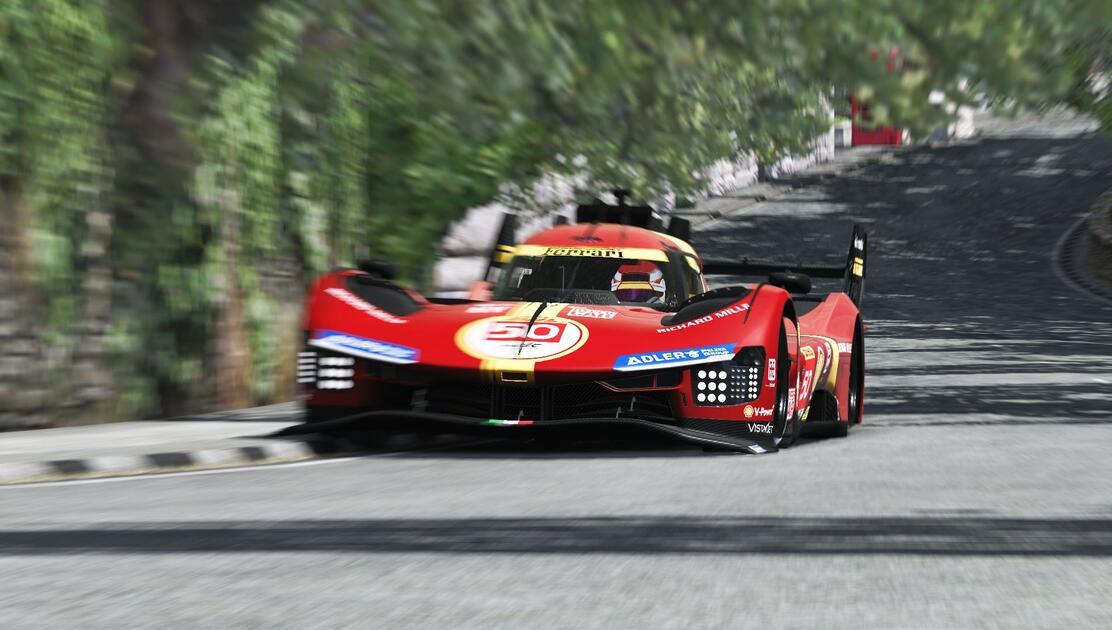
[REL] 37¾ Mile Isle Of Man Mountain Course - Conversion from GPL

Brightness is too high, need to reduce it and increase the contrast, should look like this:
Thanks for the input. Im facing some settings issues between monitor settings vs NVidia global and Rf2 settings (and HDR filter in game).
When playing isnt that bad with current monitor settings, but when watching on desktop or YouTube It becomes too bright.
I need to leave monitor settings as neutral as possible and leave to NVidia to control most of graphics stuff, i think, because what NVidia saves isnt exactly what im seeing during play time.
 
I also did a lap video a few years ago with the 499P mod, completing a lap just below 14 minutes:
Just want to point that im not that slow. I was cruising taking screenshots and making some videos, but they get too bright for some technical issue. I cannot get close to this time but also not 30 minutes slower, lol.
Cant see the vídeo now because my phone is blocking the site for whatever reason. Will watch on Pc later.
Cheers
 
Thanks for the input. Im facing some settings issues between monitor settings vs NVidia global and Rf2 settings (and HDR filter in game).
When playing isnt that bad with current monitor settings, but when watching on desktop or YouTube It becomes too bright.
I need to leave monitor settings as neutral as possible and leave to NVidia to control most of graphics stuff, i think, because what NVidia saves isnt exactly what im seeing during play time.

To get good HDR, you need an OLED or Mini LED monitor that supports high levels of contrast, otherwise a standard LCD will just give you excessive brightness that's bad for your eyes. Better turn it off.
 
Thanks for the input. Im facing some settings issues between monitor settings vs NVidia global and Rf2 settings (and HDR filter in game).
When playing isnt that bad with current monitor settings, but when watching on desktop or YouTube It becomes too bright.
I need to leave monitor settings as neutral as possible and leave to NVidia to control most of graphics stuff, i think, because what NVidia saves isnt exactly what im seeing during play time.
As far as I know, rF2 doesn't have its own native HDR profile.
However, if your monitor supports HDR, you can use NVIDIA RTX HDR.
This feature is application-specific—meaning it only affects the game, not your desktop brightness—provided you set it for the specific application rather than globally. In Windows, you just need to ensure that HDR is enabled, but keep "Auto HDR" turned off.
I’m currently using an ASUS 4K OLED monitor, and the brightness is great.
Previously, I had an LG IPS panel with HDR10 support, and it worked well on that, too
 
Im using a samsung odyssey g5. Theres is a problem when uploading rfactor file.
Left side is when playing with windows media player, right side playing in youtube player. Its the same file.
I dont know what is happening, This video im sending now is recorded with my phone/send to PC/upload to youtube. The windows media is playing the same file that was uploaded to youtube. But playing on youtube side by side with windows media, i have different results despite both of then are recorded with my phone and uploaded to youtube the same way (throught PC after recording with the phone)
 
Last edited:
As far as I know, rF2 doesn't have its own native HDR profile.
However, if your monitor supports HDR, you can use NVIDIA RTX HDR.
This feature is application-specific—meaning it only affects the game, not your desktop brightness—provided you set it for the specific application rather than globally. In Windows, you just need to ensure that HDR is enabled, but keep "Auto HDR" turned off.
I’m currently using an ASUS 4K OLED monitor, and the brightness is great.
Previously, I had an LG IPS panel with HDR10 support, and it worked well on that, too
Yes, i use this app. The thing is when its good when on track its not so good in UI. Since im most of the time on track, i can live with that

this is the video i´ve made with my phone during the above video capture.

It looks like my youtube settings mess with rf2 file settings but not from another source
 
May if i use nvidia video capture tool on the washed youtube video and upload again, it will be completly white if i repeat the process enough
 
ahahah

nvidia video capture/upload to youtube


nvidia video capture on the first nvidia video capture uploaded to youtube/upload to youtube
 
Last edited:
Just want to point that im not that slow. I was cruising taking screenshots and making some videos, but they get too bright for some technical issue. I cannot get close to this time but also not 30 minutes slower, lol.
Cant see the vídeo now because my phone is blocking the site for whatever reason. Will watch on Pc later.
Cheers
Not at all, didn't mean to make lap time comparison or anything. I like cruising too, especially with friends (we used to have Friday night drive with all kinds cars at IOM & Targa Florio, good old days...). AI is also very challenging on this track and can be good fun racing with.
 
I also did a lap video a few years ago with the 499P mod, completing a lap just below 14 minutes:
Crazy! You must have the track layout printed in your brain after making the conversion. I still strugle with nordscheleife.
But unfortunately im watching in 360p. Its like taking ayahuasca mixed with anfetamines. I had to disable vpn to get in there, There is only asian videos.
 
Back
Top